BroooApps
RenameBrooo

Built for DJs, producers,and people with way too many tracks.

RenameBrooo cleans the junk, fixes the metadata, and gives your library a structure you can actually trust.

RenameBrooo

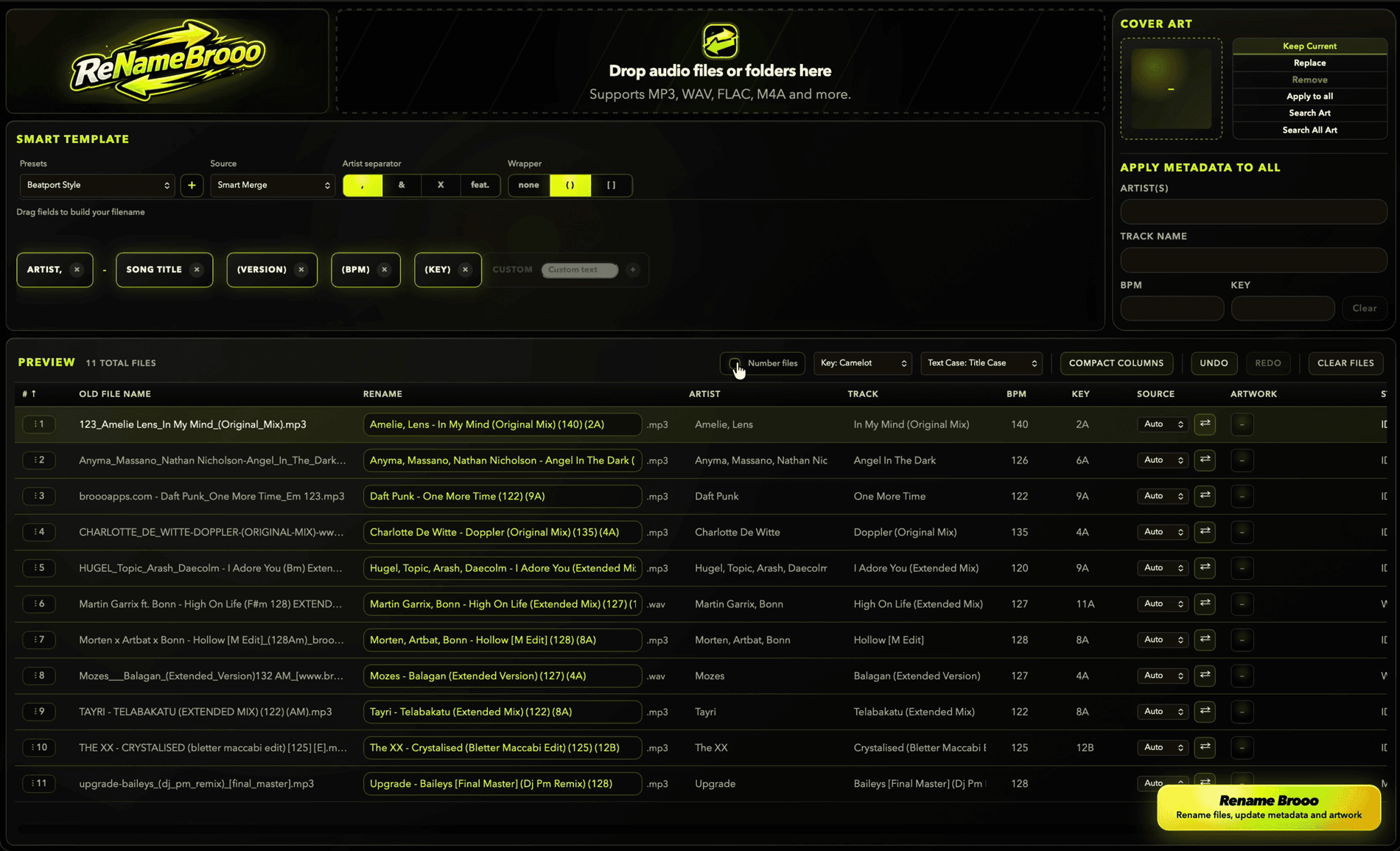
RenameBrooo desktop app screenshot

Main Value

From messy folder to clean library.

Your library is a mess. It happens. Underscores, random dashes, broken tags, wrong artwork, all over the place. RenameBrooo fixes it in seconds. It reads your files, cleans the junk, syncs ID3 tags, organizes your sets, and rebuilds everything into a clean, usable format, automatically or exactly how you like it.

Inside the app

Real controls from the RenameBrooo workflow.

RenameBrooo UI
RenameBrooo smart template controls

Smart Template

Build the exact filename structure you want.

Start with a preset, then drag fields like artist, title, version, BPM and key into the order that fits your library.

Drag fields into orderUse presets for speedCustomize naming rules
RenameBrooo UI
RenameBrooo rename preview table

Preview

See the cleanup before anything changes.

Check old names, renamed output, metadata fields and batch actions in one place before exporting clean files.

Compare before and afterEdit metadata inlineRun batch actions safely

Batch rename thousands of audio files instantly

Clean huge folders of tracks in seconds instead of fixing filenames one by one.

Remove underscores, dashes, and random clutter

Turn messy downloads into readable names that make sense in your library.

Smart ID3 tag fixing and syncing

Sync filenames and metadata so artist, title, version, BPM and key stay aligned.

Match filename to artist, title, version, BPM, key

Build a clean structure from the fields DJs actually care about.

Presets when you want speed, custom rules when you need control

Pre-built presets like Beatport-style formatting when you just want clean names fast. Or create your own, your structure, your rules.

Scalable UI that keeps up

Fast, clear controls that stay usable even with thousands of tracks.

DJ & Workflow

Set prep without the file-name chaos.

Number tracks for perfect DJ set order

Keep intros, edits, transitions and planned set folders in the exact order you need.

Replace cover art across multiple files

Clean decks, consistent look, less visual chaos in your music library.

Edit any field manually

Full control when you need it, even when automatic cleanup is not enough.

Bulk edit albums or full releases

Update full releases in one click instead of repeating the same edit again and again.

How it works

Clean files, then get back to the music.

1

Drop your messy music folder.

2

RenameBrooo clean the names and fix the tags.

3

You tweak what matters.

4

Export clean files.

5

Go grab a coffee. You're done.

Interactive Online Demo

Try RenameBrooo

A visual demo of the desktop workflow. No files are uploaded, renamed, or processed here.

License & Download

Get it. It's free.

macOS only for now

Download access appears in My Apps after your license is active.

Included right now

Open secure FastSpring checkout for RenameBrooo.